AI Products · Enterprise Fleet · Agentic UX

AI Products AI Workflow Design Ops Change Management

AI-Powered UX Workflow Transformation

When Gemini became the only AI allowed inside Verizon's locked-down enterprise, nobody knew what to do with it. I built ten purpose-built agents woven into the existing workflow — without tearing it up — and shifted 42 designers from tactical executors to strategic pilots.

Client Verizon Value (6 Brands)
Role Lead Product Designer (Agentic UX & AI Systems)
Year 2025 – Present
Scope UX Strategy, AI Architecture, System Integration
NDA
Confidentiality Notice

This case study describes the work at a high level. Specific metrics, internal tooling configurations, agent instructions, and proprietary processes have been generalized or anonymized to respect client confidentiality. The frictions, architecture, and design thinking remain authentic to my contribution.

I designed 10 AI agents for the product-development flow.

Not demos — working teammates. Born from the team's real pain, built inside a locked-down enterprise stack, running in production with 42 designers.

16
one-hour interviews conducted
40+
friction points mapped
10
agents designed & shipped
42→80+
people onboarded
01
Master Brain
Single Source of Truth
The organizational memory. Ask it anything the project has ever known.
02
Justin Case
Edge Case Detector
Breaks the logic before the code is written — 20–40 ranked edge cases per audit.
03
Sally
Principal CX Strategist
Science-backed UX evaluation for when user testing isn't an option.
04
WDS Team
Strategic Design Engine · 5 Agents
Five specialists relaying brief → strategy → spec → prototype.
Mimir Saga Freya Idunn Eira
05
Clara
UX Writing Evaluator
Judges every word against the brand-voice guidelines.
06
Alex
The Agent Architect
A skill creator — the agent that designs new agents.
Where I started

DiagnosisThe system I was working in

The real problem

The problem was never the tools. It was the shape of the org.

Business and Technology scoped every project before design or strategy entered the room. There was no budget to test, so the highest-position opinion won. By handoff, the good UX was already out of scope. Everyone felt it — the designers, the strategists, even the design leaders. No one could move it.

One project. Pain at every stage.

This was the normal flow — and the point where design lost control at each step.

01
Initiation
Business + Technology define the scope and budget.
Pain
Design & strategy aren’t in the room. Scope is locked before any UX exists.
02
Kickoff
The XM / PM team writes the brief — and even proposes the UX direction.
Pain
Designers arrive after the key decisions are already made.
03
Design
The team designs fast against a fixed scope and timeline.
Pain
No budget for usability testing. usertesting.com is off the table.
04
Alignment
Designs are reviewed up the chain and across teams.
Pain
No data, so the loudest voice wins — and late edge cases here mean rework, back in Figma.
05
Handoff
Engineering finally receives the design to build.
Pain
“Out of scope — can’t build it.” The best UX dies at scope set months ago.
06
Post-launch
The product ships and is meant to iterate on data.
Pain
Design hears nothing back — no data, no access to users, nothing to iterate on until the next project.

The through-line: at no point did design hold the evidence, the scope, or the timing. Frustration pooled at every stage.

The dilemma

Design leaders saw it. They still couldn’t change it.

Everyone, even the leaders, got overruled somewhere up the chain. So as a single designer I stopped trying to rewrite the org — and started architecting AI into the exact moments where it hurt, inside the workflow everyone already used.

The approach

MethodHow I found what to build

From complaint to blueprint

I couldn’t fix the org. So I found exactly where it hurt — and built for that.

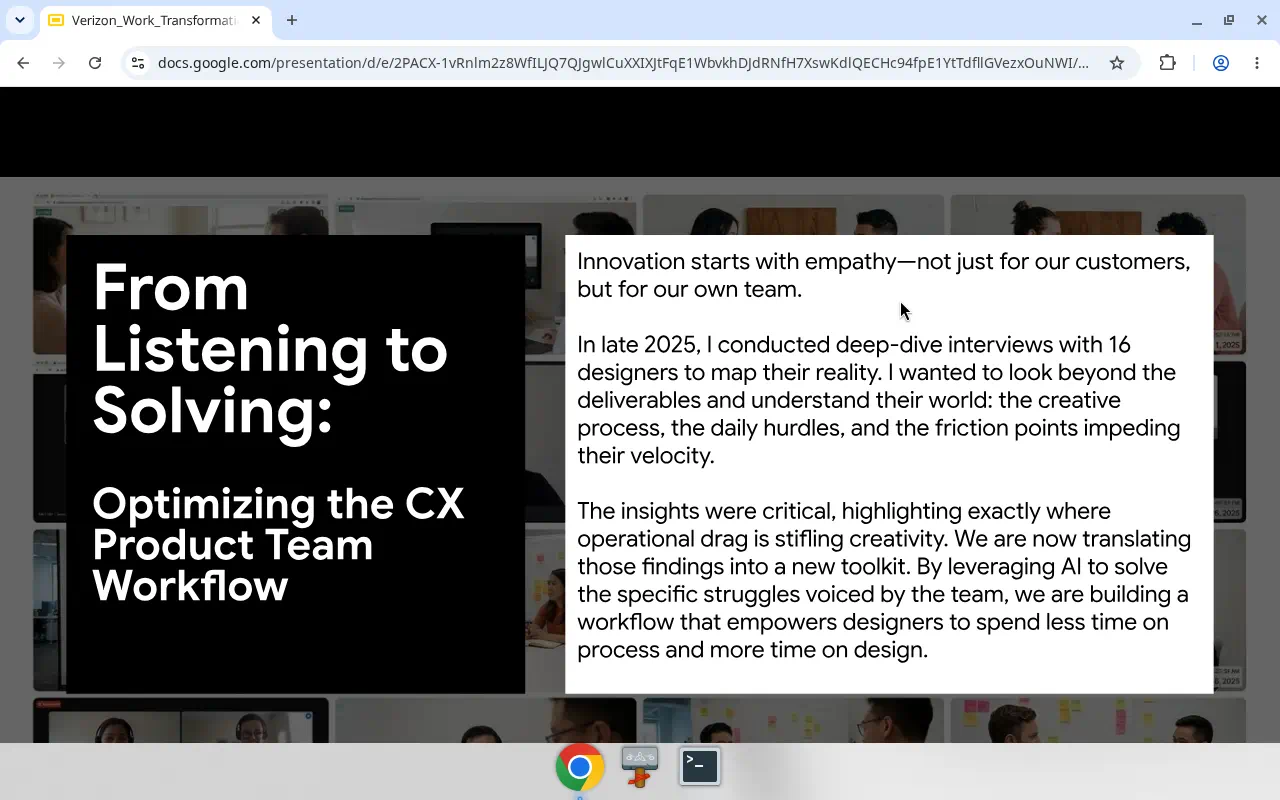
I sat down with more than sixteen designers and strategists, one hour each, and listened. Then I turned the raw frustration into a map — and the map into a build list. The agents further down this page are simply the bets that survived it.

Listen → map → pilot.

01
Listen
16+ one-hour 1:1 interviews with designers & strategists.
02
Analyze
Every transcript into AI — cluster the pros, cons, and real pain.
03
Prioritize
An effort × impact × opportunity matrix separates quick wins from the untouchable.
04
Ideate
Generate many AI solution concepts against each ranked pain.
05
Select
With leadership and the team, pick the bets worth piloting.
06
Pilot
Build, run in real projects. The ones that worked became the agents.
16h+
The unlock was the analysis itself. Every interview transcript went into NotebookLM, wired to Gemini — so 16+ hours of raw conversation became a navigable map of the pain in days, not weeks: clustered, ranked, and searchable instead of buried in video.
What worked

A working agent was never one prompt — it was a stack of files.

Each one I built was really a small filesystem: a workflow file that sequenced the steps, an agent-definition file that fixed its role and rules, and separate deep-knowledge files it reasoned from. Studying BMAD’s spec-driven method taught me the lesson — it’s this structure, not clever wording, that lets an agent do genuinely fine-grained work.

And I earned it the hard way: version after version of each Gem, testing the outputs, feeding a Gem’s own results back in to sharpen its instructions — until it was reliable enough to hand to a 40-person team.

The answer

What I built

From diagnosis to system

Sixteen interviews. Forty pains. Ten agents that answered them.

The whole diagnosis pointed to one move: stop patching the org, and build. Each structural failure got a purpose-built agent aimed straight at it — Master Brain, Justin, Sally, the WDS studio — and more. Here is each one, and the failure it replaced.

Friction
Tribal Knowledge Trap
Knowledge fragmented in heads and Slack threads
AI Solution
Master Brain
Three-layer knowledge hub (Brand, Research, Project) on NotebookLM. Single source of truth that eliminates tribal knowledge dependency.
Friction
Late-Phase Discovery
Edge cases surfaced after handoff at 10x cost
AI Solution
Justin — Edge Case Detector
4-layer deep scan across data, system, user state, and temporal layers. Outputs a Logic Gap Matrix before a single line of code is written.
Friction
Designing in the Dark
No budget for user testing, opinion-based decisions
AI Solution
Sally — Principal CX Strategist
Behavioral-science-grounded agent (Fogg, Nudge Theory, Cognitive Load, Nielsen’s Heuristics) that audits flows and returns ranked strategic options. Replaces the void where user testing should have been.
Friction
Strategic Design Compression
Speed pressure eliminated all strategic thinking
AI Solution
WDS — Strategic Design Collective
Multi-agent design engine with specialist roles. The system does the scaffolding. Humans do the judgment.
You’ve seen the what · below is the how

The deep dive — each system, up close.

Everything above is the whole story in brief. Read on for how each agent actually works — five key systems are profiled below.

System 01 · Single Source of Truth

Master BrainThe organizational memory

The biggest one

One project brain. Every answer, on demand.

Knowledge lived in heads, emails, and research PDFs no one had time to read — the research team ran deep brand studies five to eight times a year that never reached a busy project. Deep experts were underused. So I built a single place that holds it all and answers back.

Feeds in · conceptual
Brand Master Brain

Brand history, voice, and standards — so every project inherits what the brand already knows about itself.

Feeds in · on NotebookLM
Research Master Brain

Every deep study the research team produces — finally readable on demand, pulled into whichever project needs it.

feed into the project
System 01 · Single Source of Truth

Project Master Brain

All project scope, business docs, CX strategy, technical requirements, and every meeting transcript — synthesized into answers in real time. Ask it anything the project has ever known.

Instant onboarding

New teammates get productive in minutes — even an auto-generated onboarding video from 120+ sources.

Deep-dive on demand

Ask anything, go as deep as the project needs — no gatekeeper, no waiting.

Tangled requirements, answered

Activation, account creation, add-a-line — business + technical complexity resolved in seconds.

Never stale

Every meeting transcript is in within 24 hours. The brain keeps learning.

It answered the questions no one had time to answer.

Mobile activation, account creation, add-a-line — where business rules and technical requirements tangle together, the Project Master Brain replied accurately and fast, saving real hours. On one payment-flexibility initiative it could articulate the entire business case on demand: the customer suspension gap, the recoverable nine-figure annual revenue, and the three “how might we” questions the design had to answer. That’s the difference between a file archive and an organizational memory.

Adopted & owned
The XM (Experience Manager) product-strategy team loved it, took ownership, and ran it across multiple real projects — the rare case where a design-born tool crossed the aisle and stuck.
System 02 · Edge Case Detection

Justin CaseEdge Case Detector

Break it before build

Break the logic before a line of code exists.

The name is the pitch — built to check things just in case. A Gemini Gem wired to a dedicated NotebookLM of edge-case detection resources, Justin runs a structured deep scan on a design before it ever reaches a developer's queue.

Designers design the happy path. Users don't live there.

Every flow hides the same three traps — and they all come due at the most expensive possible moment.

01
Logic Gaps
Contradictions hidden between the business rules and the UX flow that implements them.
02
Invisible States
Missing definitions for loading, empty, or error states — the ones nobody designs until something breaks.
10×
The Cost of Waiting
Fixing a bug in development costs roughly 10× more than catching it at the design stage.
Illustrated portrait of Justin Case, the Edge Case Detector AI agent, examining a layered wireframe stack with a magnifying glass
The 4-Layer Deep Scan Protocol

Four layers. Every gap ranked. No code written yet.

Fed the Project Master Brain, an Initiative Alignment Brief, and optionally the existing UI, Justin scans across four layers and returns a ranked matrix — each gap paired with an open question product and engineering must resolve before build.

Project Master Brain Alignment Brief UI screens (optional)
Layer 01
Data
Invalid inputs, massive lists, empty states, special characters.
Layer 02
System
Latency, timeouts, offline modes, double-clicks.
Layer 03
User State
Guest vs. logged-in, suspended accounts, permissions.
Layer 04
Temporal
Timezone conflicts, session timeouts, “back” button errors.

Type #audit — get 20–40 ranked questions engineering has to answer.

Each catch is phrased as a question, not a complaint. Real ones from a single payment feature: what happens to a payment made at 11:59 PM when the system suspends the account at 12:02 AM? Does a user in Guam (UTC+10) see “Day 0” while US-Eastern servers still say “Day −1”? If AutoPay batches lock 24–48 hours ahead, does the user get double-billed? What does five rage-clicks on “Pay” during a 60-second API hang actually charge?

Held up to scrutiny
On a plan-migration initiative, the PM and engineers reviewed Justin's findings line by line and rated most four to five stars — catches like a suspended-line migration trap and legacy-promo removal that would otherwise have surfaced months later, in production.
Save time
The “what if?” scramble during development stops — the questions are answered before build starts.
Prioritize
Decide now which edge cases to fix and which to consciously ignore — with the trade-off on the record.
Confidence
Hand off designs that are bulletproof. Zero surprise, decisions made early.
System 03 · CX Strategy Engine

SallyPrincipal CX Strategist

When testing isn’t an option

No budget to test? Test against human psychology.

A Gemini Gem paired with a dedicated NotebookLM knowledge base, Sally fills the void where user testing should have been — stress-testing a flow against behavioral science instead of the highest-paid person's opinion.

Feed her three things
01
Happy-path UI
The exported screens, as designed.
02
The user goal
What the person came to get done.
03
The persona
Who they are, and what they bring.
Autonomous · 8-Step Deep Analysis
She runs the whole audit across three layers.
Strategy
the Why
Logic
the How
Visuals
the What
Grounded in
Fogg Behavior Model Nudge Theory Cognitive Load Theory Nielsen’s 10 Heuristics ISO 9241-210 Jobs-to-be-Done Double Diamond Visual Saliency & Thumb Zone

Not an opinion. A verdict — with a number.

Auditing a device-activation flow against its persona, Sally found it treats an owner (who already holds the device) like a shopper (who needs to buy) — triggering “double-payment anxiety” and abandonment at the exact screen where a cart total appears.

41/100
Overall CX Score: Fail
Verdict: critical strategic failure — an "identity crisis" between owner and shopper.
Strategy — the Why20/100
Critical: solving for "sales" instead of "setup."
Logic — the How45/100
High friction: heuristic violations (recall vs. recognition).
Visuals — the What60/100
Moderate: price saliency overpowers the primary action.

Never one answer — always a ladder of options.

For each friction, Sally returns three tiers — quick fix, standard, north star — each with its reasoning attached. One example, for a manual serial-number entry that violated Fogg's Ability principle:

Option A — Quick Fix
Input Masking
Auto-format the field in groups of four as the user types — reduces cognitive load by allowing easier spot-checking.
Option B — The Standard
Camera Scan
A "scan barcode" button opening the browser camera — eliminates typing entirely, cutting time-on-task roughly 40%.
Option C — North Star
Zero-UI (Auto)
A QR code on the packaging pre-fills the data — removes the step completely, but requires a supply-chain update.
Where Sally started

A UX evaluator

Feed her the three files and she graded the finished flow — a multi-lens analysis of where the design fought human psychology, scored and cited. Powerful, but it happened after the design was done.

Happy-path UI User goal Persona Multi-lens analysis
What she became

A design partner

Now she helps shape the design, not just test it — framing the brief, proposing the strategy, and generating ranked options before a pixel is committed. Not a grade at the end; a collaborator at the start.

Alignment briefs Strategy framing Ranked options Shapes, not just scores

What Sally produces

  • Initiative Alignment Briefs — framing a project's business case and CX opportunity before design work starts.
  • CX Audit Reports — detail report, executive summary, and slide deck, scored sub-score by sub-score.
  • Strategic Options slides — for each friction found, ranked solution paths with trade-offs a designer can defend to stakeholders, not a single fix handed down.

The team's gain is threefold: instant self-auditing without testing budgets or lead times, scientific consistency — every screen held to the same ISO and behavioral-science standards — and internal validation, so designers walk into stakeholder reviews with evidence instead of hope.

System 04 · The Breakthrough

WDSWhiteport Design Studio · 5-agent collective

The breakthrough

Agentic design, carried into a browser tab.

The agent workflows that power Claude Code and Codex live in the engineer's terminal — a place our product-design org simply could not go. No CLI. No VS Code. No API. Just Gemini in a Chrome tab. My core contribution was to rebuild that terminal-grade, agent-led design process as a set of Gems the whole team could open, share, and run — inside the one locked-down stack we were allowed to touch.

Where agentic power lived

The engineer's terminal

Command line, spec-driven agents, version control, direct model access. Powerful — and completely off-limits to designers.

Claude Code Codex CLI / Terminal VS Code MCP Git
Where designers actually worked

One browser tab

Strategy, UX, and product-design teams had exactly one approved AI surface — Gemini in a browser. Installing anything else was a battle.

Gemini Gems NotebookLM Canvas Figma Make
01Beat the context window

From one giant prompt to a filesystem.

My first agents were single, sprawling prompts — and they collapsed under their own context. The fix was architectural: break each agent into small, versioned parts — a workflow that sequences the steps, and separate knowledge files it loads only when needed.

Authored in Claude Code, deployed as a Gem. The agent stopped forgetting — and I stopped fighting the window.

workflow.md knowledge/ menu-commands.md audit-protocol.md agent-instructions.md
02Make it shareable

NotebookLM worked alone. Google Drive worked for everyone.

Solo, a Gem wired to my own NotebookLM was brilliant. The moment I shared it, it broke — the knowledge and sources didn't travel with the Gem. So I moved the workflow and knowledge files onto Google Drive: one shared, governable source that every teammate's Gem could load the same way.

That turned a personal trick into an organizational capability — the real unlock for a 40-person team.

03Smuggle in the tools

I installed VS Code myself — then wired Figma to it.

In a design org where even installing VS Code was a fight, I set it up, connected it to AI, and linked it to Figma via MCP. Suddenly I could turn Figma frames into code, build the design system as real tokens, and feed those tokens back into prototyping.

The payoff was fidelity: AI prototypes that obeyed the brand from the very first prompt, because they were grounded in the actual design-system code.

VS Code Figma MCP Design tokens as code High-fidelity prototypes
Technique
Ground AI in design-system code
Feed Figma Make and Gemini Canvas the real token components — high fidelity from the first prompt.
Technique
Separate ideation from execution
“Show me 40 ways to solve X.” Generate a gallery of variations before committing a single pixel.
Technique
Turn documents into slides & storyboards
An alignment brief becomes an editable deck, or full storyboard frames the other Gems can illustrate.

It spread because I never issued a decree.

The org was siloed and stiff; a top-down “everyone use AI now” was never going to land. So instead of replacing the product-development flow, I found the exact moment each role felt pain and slipped a genuinely useful agent into it — then connected those moments back into the flow.

01
Listen
16 × 1-hour 1:1 interviews with designers & strategists.
02
Analyze
All transcripts into NotebookLM — AI-clustered pros, cons, pain.
03
Rank
An effort × impact matrix picks where to strike first.
04
Ideate
AI brainstorms concepts against each ranked pain point.
05
Prototype
High-fidelity concepts built for leadership to react to.
06
Insert
The chosen ones ship — slotted into the exact painful step.
~40
Then I taught it — weekly hands-on workshops for roughly 40 designers, every Gem shared to run live, until the team was building agents of their own.

The result: a five-agent design studio.

Codenamed after Norse gods, the WDS agents relay a brief forward — brief → strategy → interaction → architecture → visuals — each a Gem I designed, each grounded in shared Drive knowledge. Built on BMAD's spec-first discipline, but retargeted from shipping code to shaping concepts precise enough to hand a developer.

M Illustrated portrait of Mimir, the WDS Orchestrator AI agent, a wise guide routing work to the right specialist
Agent 01
Mimir
Orchestrator
The wise guide. Assesses your level, sets up the project, and routes you to the right specialist.
S Illustrated portrait of Saga, the WDS Analyst AI agent, a strategic thinker mapping business goals to user psychology
Agent 02
Saga
Analyst
The strategist. Turns the brief into trigger mapping — tying business goals to user psychology.
F Illustrated portrait of Freya, the WDS Designer AI agent, a UX/UI specialist turning strategy into interaction flows
Agent 03
Freya
Designer
The UX/UI specialist. Converts strategy into usage scenarios, interaction flows, and conceptual specs.
I Illustrated portrait of Idunn, the WDS Architect and PM AI agent, bridging design concepts to technical requirements
Agent 04
Idunn
Architect / PM
The bridge to engineering. Translates concepts into platform architecture and technical requirements.
E Illustrated portrait of Eira, the WDS Visual Designer AI agent, creating visual concepts, brand explorations, and design tokens
Agent 05
Eira
Visual Designer
Works with image-generation tools to create visual concepts, brand explorations, and design tokens.

Fed the Project Master Brain and an alignment brief, the studio relays the work forward — and out the other side comes a CX/UX strategy, multiple solution scenarios, and prototyping prompts ready for Gemini Canvas or Figma Make. On one payment project it took a tangled brief from chaos to concept: strategy first, then interactive prototypes built on the brand's real design-system tokens — and when the team wanted breadth, dozens of interaction variations of the same flow, generated at once.

Clara & Alex — the Guardian and the Builder

Agent 05 — UX Writing Evaluator
Clara
Every screen ships with words, and words drift off-brand faster than pixels do. Clara evaluates copy against the brand-voice guidelines — clarity, accessibility, tone — and returns a verdict with rewrites, so content quality gets checked as systematically as the UX itself.
Agent 06 — The Agent Architect
Alex
The meta-agent: an agent-design tool — think of it as a skill creator. Describe a job, and Alex interviews you, drafts the Gem instruction set, wires up the knowledge base, and hands you a working specialist. Designers who couldn't write a prompt six weeks earlier were building their own agents. The system became self-replicating.

Workflow Transformation

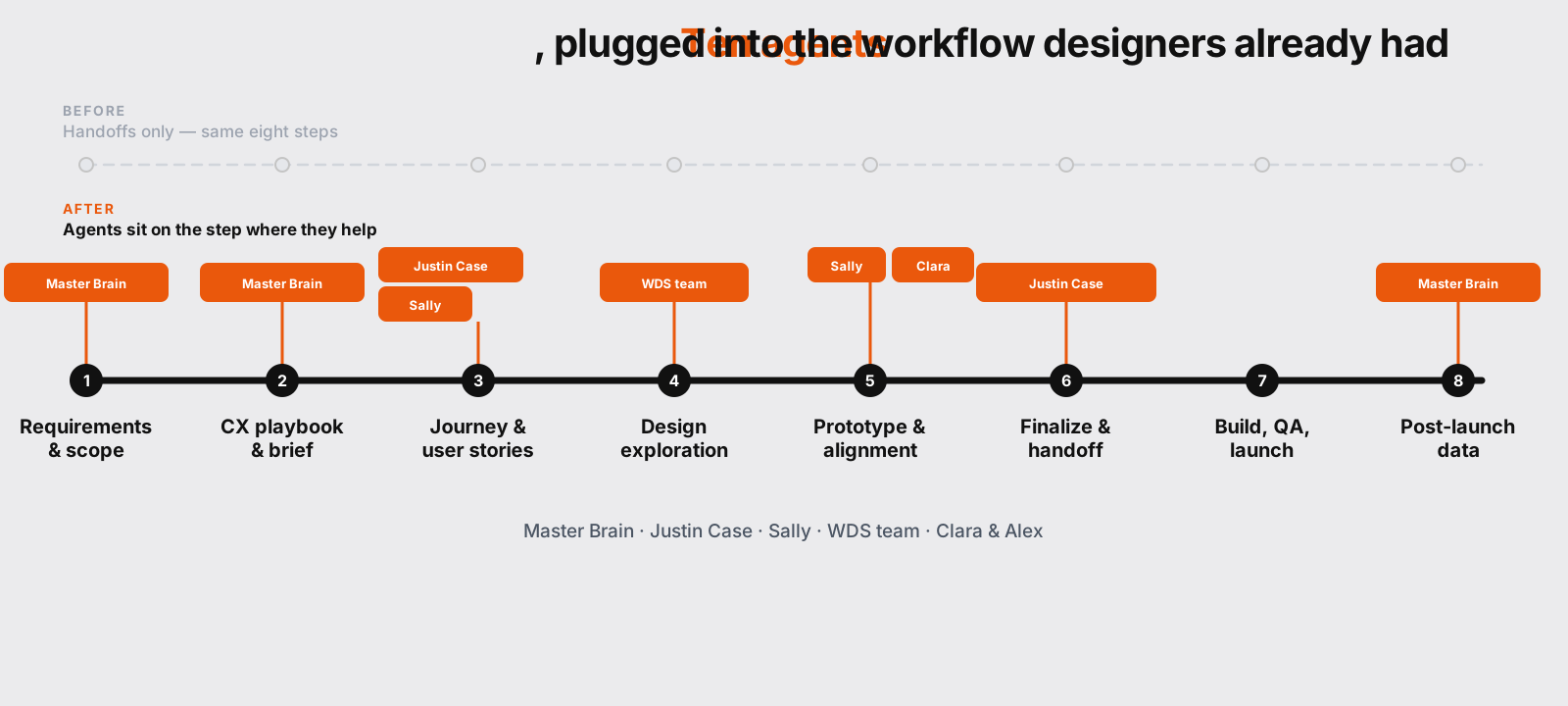
The workflow sequence stayed the same: BRD, CX Playbook, User Journey, Design, Prototype, Handoff, QA, Launch. But every phase now has an AI agent running in parallel — surfacing context, validating assumptions, catching edge cases.

New Workflow with AI Agents

BRD / Tech Requirements
Initiative Alignment Document
Edge Case Detection
Functional Prototype
Design Exploration
Synthetic Usability Testing
Project Masterbrain
Multi-Agent Design Engine (BMAD/WDS)
Edge Case Detection
Synthetic Usability
NotebookLM
Gem
Canvas
Figma Make
Prototyping / Stakeholder Alignment
Design Finalization
Handoff / Implementation
QA
Launch
Post-Launch Data

Scale & Outcomes

42 → 80+
Designers to cross-functional stakeholders (PM, research, content) in rollout expansion
6
Brands across Verizon Value portfolio targeted for full transformation
10x → 0
Edge case rework cost eliminated by detecting issues during ideation, not development
The Cognitive Shift
Before: Designers operated tactically. They filled gaps left by broken processes. They were reactive. They were exhausted.

After: Designers operated at the strategic level the role was always supposed to require. They made decisions. They challenged assumptions. They designed with evidence.

Same pipeline. Fundamentally different output.

Four Lessons

01
AI Amplifies Your Architecture
If your knowledge is fragmented, AI gives you fragmented answers faster. Fix the architecture first. Then add AI. Never reverse the order.
02
Start With Pain, Not Technology
The right question is never "how do we use AI?" It's "where does the pain actually live?" The solutions emerged from diagnosis. Every single time.
03
Constraints Are a Design Brief
Gemini and NotebookLM. That was it. No custom models. No API access. Constraints forced architectural thinking. The walls became the floor plan.
04
Specificity Makes Agents Useful
Specific inputs. Specific outputs. Specific job. Vague agents produce vague results. Precise agents replace structural failures.
1 / 1