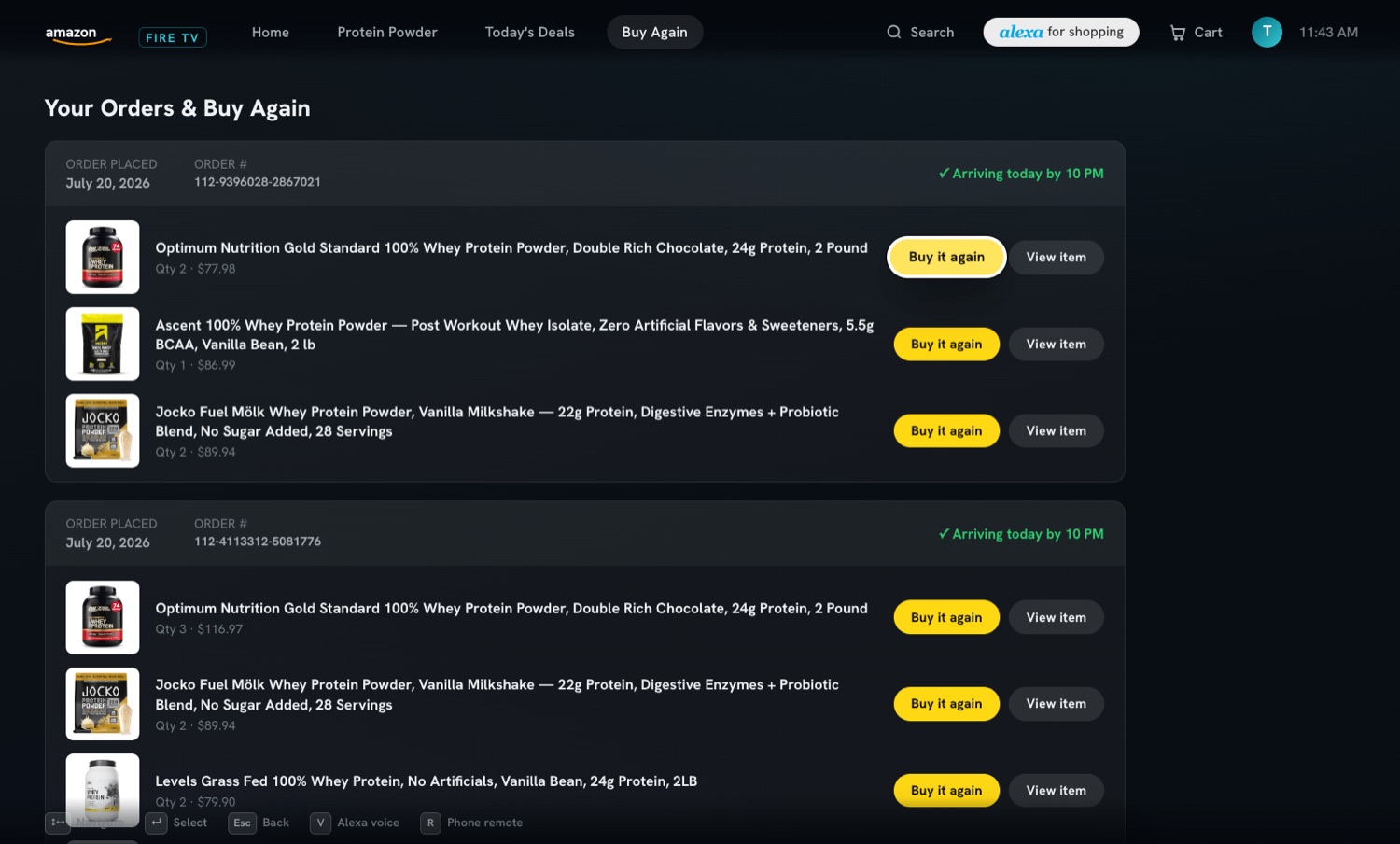
Amazon Shopping on Fire TVFire TV 向け Amazon ショッピング
Amazon shopping rebuilt for the TV: D-pad, voice, and your phone as the remote. A self-initiated concept, not affiliated with Amazon.テレビのための Amazon。D-pad と音声、そしてリモコンになるスマホ。自主制作のコンセプトで、Amazon とは関係がない。
Try the demoデモを試すChallenge課題
Shopping from the couch should be effortless, but typing with a remote is painful, browsing thousands of products with a D-pad is slow, and voice alone can't show enough. The experience gets stuck between lean-back convenience and lean-in detail — no single input mode covers the whole journey.ソファからの買い物は楽であるべきだ。でもリモコンでの文字入力はつらく、D-pad で何千もの商品を見るのは遅く、音声だけでは情報が足りない。くつろいで眺める楽さと、身を乗り出して確かめる細かさの間で、体験が止まってしまう。ひとつの入力方式では最後までたどり着けない。
Solution解決
The TV stays the stage; the phone becomes the best input device. D-pad for discovery, Alexa-style voice for intent, and a phone paired by QR — no app, no login — for typing, pointing and a private mic. The decisive move was running all three as one system, so switching modes never feels like switching apps.テレビは舞台のまま、スマホを最良の入力装置にした。探すのは D-pad、意図を伝えるのは Alexa 風の音声、文字入力や細かな操作、手元のマイクは QR でつないだスマホ。アプリもログインも要らない。決め手は、3 つを一つの仕組みとして動かし、入力を切り替えてもアプリを行き来する感覚にさせなかったこと。
Impactインパクト
I proposed a Fire TV shopping concept pairing the remote, voice, and phone-as-keyboard without an app.リモート・音声・スマホ入力を組み合わせた Fire TV ショッピング概念を提案した。
What I handled担当フェーズ
- Researchリサーチ
- Business / Strategyビジネス/戦略
- Conceptコンセプト
- UX / UIUX/UI
- Design Systemデザインシステム
- Prototypeプロトタイプ
- Build実装
- Launch / Growthローンチ/グロース
The TV is the stage, the phone is the input テレビは舞台、スマホは入力
Each input does the job it is best at. The D-pad browses rails of products from across the room. Voice carries intent: press V or the mic and say “show me chocolate protein”, “add this to my cart” or “checkout”, and a local intent parser routes the command. When you need to type, point precisely or talk privately, the phone is already paired: it becomes a D-pad, joystick, trackpad, search box and hold-to-talk mic. The TV layout is built for ten feet — oversized focus rings, a dark, high-contrast screen. 入力ごとに、得意な仕事だけを任せた。部屋の向こうから商品の列を眺めるのは D-pad。意図を伝えるのは声。V キーかマイクを押して「チョコ味のプロテインを見せて」「カートに入れて」「購入」と言う。すると端末の中の意図解析が、命令を振り分ける。文字を打つ、細かく指す、小声で話す。そのときスマホはもうつながっていて、D-pad、ジョイスティック、トラックパッド、検索欄、押して話すマイクになる。テレビ側の画面は 3 メートル先から見る前提で、大きなフォーカス枠とコントラストの強い暗い画面にした。
Open the simulator full screen シミュレーターを全画面で開くOne scan to pair, one state on both screens 読み取りは 1 回、状態は両方の画面で同じ
Pairing runs on snap-pair, my open-source pattern (now published as snap-pair-core): a QR code or a 6-character room code as the rendezvous, room membership checked on the server, a presence heartbeat, and automatic cleanup when someone leaves. The library has since grown to also support 6-digit PIN, experimental ultrasonic sound pairing, and transports beyond Firebase (PartyKit, WebRTC, BroadcastChannel). Once paired, the cart count, the current screen and the search context are mirrored to the phone in real time, so the remote always knows what the TV is showing. The whole prototype is plain HTML, CSS and JavaScript with Firebase and the Web Speech API — no bundler, no framework — so it runs from a folder or any static host. 接続には、自作して公開している snap-pair の型を使った。QR か 6 文字のルームコードを待ち合わせの目印にし、部屋への参加はサーバー側で確かめる。つながっているかを定期的に確認し、抜けた人は自動で片づける。つながった後は、カートの点数、いま出ている画面、検索の文脈がリアルタイムにスマホへ映る。だからリモコンは、テレビが何を見せているかを常に知っている。試作全体は素の HTML・CSS・JavaScript に Firebase と Web Speech API だけ。バンドラーもフレームワークもなく、フォルダーひとつ、どんな静的ホストでも動く。